



Photo by shawncampbell
twitterの呟きをWeb上に表示するツールとして「Blackbird Pie」が多く使われていましたが、気がついたら無くなっているじゃん^^;
ということで、代わりになるものを探していたらブックマークレットで生成出来る「Blackbird bookmarklet」という便利なものがあった。ブックマークレットなので、簡単に作れるのが非常に便利!!
Real-time curation » Blog Archive » Blackbird bookmarklet: publish a tweet in html
to your Bookmarks Bar. Now, getting HTML code to embed a tweet is as easy as 1-2-3: …
ブックマークレットを登録
ブックマークレットを登録するには、Webページにある「BlackBird bookmarklet」をDrag&Dropするだけ!!
はい。簡単。
使い方
以前のBlackBird Pieでは8つのステップをしなくてはいけなかったのが・・・。
1.Copy the full URL of a tweet (e.g. http://twitter.com/xxxxxxxxxx)
2.Go to http://media.twitter.com/blackbird-pie/
3.Click on the input text field
4.Paste the URL
5.Click on “Bake it”
6.Click on the text area where the HTML code is created
7.Select all text (press ctrl+a or cmd+a on a Mac)
8.Copy (ctrl+c or cmd+c on a Mac)
このブックマークレットを使えば3つのステップで貼り付ける事が出来ちゃう。
1.Go to the URL of a tweet (e.g. http://twitter.com/xxxxxxxxxx)
2.Click on the bookmarklet
3.Copy (press ctrl+c or cmd+c on a Mac)
Twitterの個別のつぶやきからブックマークレットを起動するとCodeが取得できる。
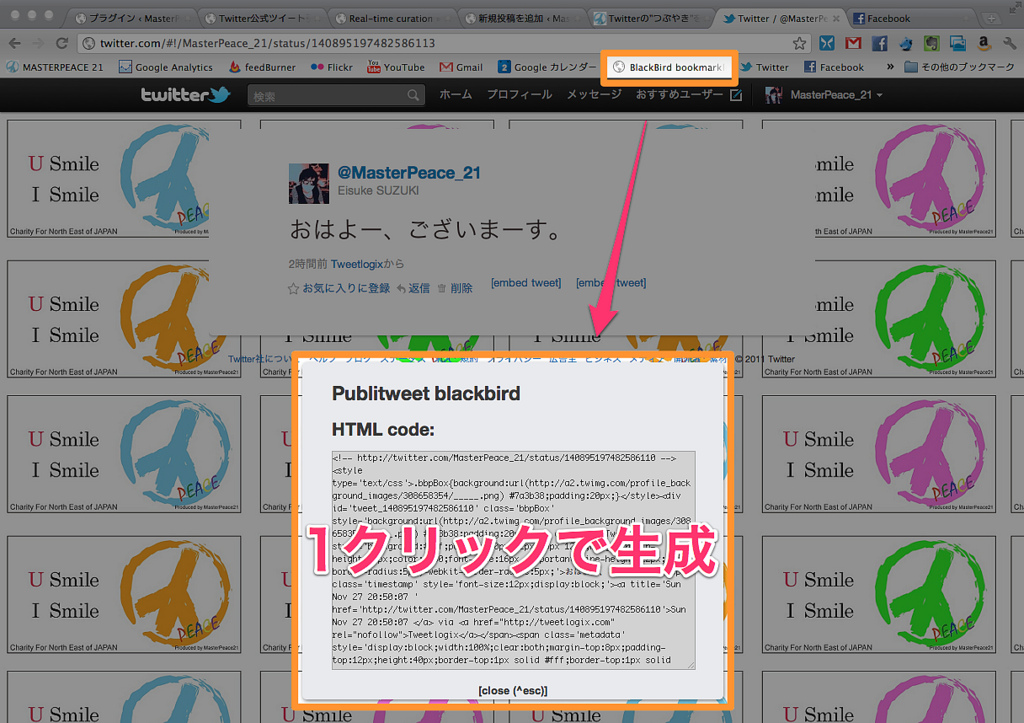
これを貼りつけると・・・
おはよー、ございまーす。 Eisuke SUZUKI
MasterPeace_21
このように、ちゃんと表示がされる。
はい、終わり!!めっちゃ簡単!!便利!!(・∀・)
嬉しいのが、日付が”何時間前”とかでは無く、正確な日時が表示されている点。これは見返しやすいよね。
私のTweet画面は背景が白で区切りがわかりにくいが他の色の背景なら綺麗に取得できるはずです。

